
What’s New in Hero Schedule: A Roundup of Recent Updates
We’ve shipped a lot over the past several months, including new bidding capabilities, a rebuilt accruals experience, more flexible overtime policies, and continued accessibility improvements. Here’s a look at the biggest changes and why they matter for your agency.
Smarter, more flexible shift bidding

New Search & Filter bar in shift bidding area
Bidding saw the most investment of any area, with several features aimed at handling complex, real-world seniority and coverage rules.
Phased Bidding. A single bidding schedule can now collect multiple choices from each bidder and automatically make multiple assignments per person, very useful when one round of bidding needs to fill several slots per employee. You can also add filters that stop employees from selecting shifts that overlap an earlier-phase pick or exceed a configurable daily hours limit, and employees see exactly why a filtered shift is unavailable.
Pre-bidding. For sprint and standard bids, employees can now rank their preferred shifts before their turn opens. When their turn comes, the system places the bid automatically. Nobody loses their spot to a scheduling conflict or a missed window.
Better protection across classification groups. Incumbent protection now extends across related classification groups, so seniority rights apply more consistently within shared protection pools. We also fixed cases where a protected employee could lose protection when moving between groups or be incorrectly bumped by a lower-seniority bidder.
Clearer results and admin control. Bid results now show each employee’s bid order (including pending overrides) so admins can review assignments by seniority at a glance. Admin overrides that move an employee or displace a protected assignment are now clearly flagged, and a new orange pin distinguishes employees pinned elsewhere after a displaced protected bid. Admins can also override the ranking and directly assign a worker to a shift, with all remaining assignments automatically recalculated. Ranked schedules can even be adjusted mid-bid with Save and Recalculate, rather than waiting for bidding to finish.
More ways to bid and filter. Employees can now filter available shifts by search text, start time, weekly hours, activity, days off, and more. Standard and sprint bids end automatically once everyone has had their turn, progress bars and a countdown timer show how much time remains, and results can be downloaded in multiple formats.
Rebuilt accruals experience
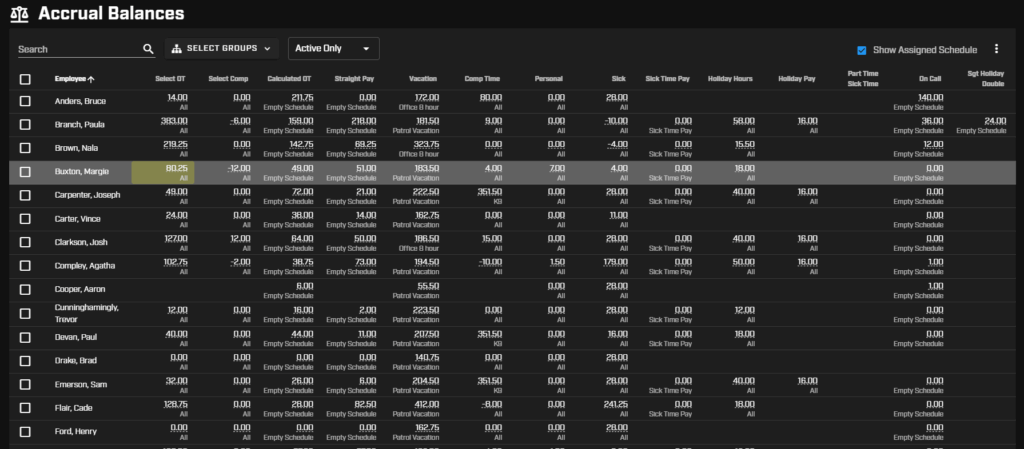
New accrual balances screen
Redesigned Accrual Balances page. We rebuilt this page with better filtering, configurable columns, transaction-level detail, and bulk manual entries. Accrual schedule assignment is now managed here too, making it much faster to see current balances and make changes. Balances also now clearly show begin, end, and cutoff dates for more confident history reviews.
Accrual Basis Date. You can now set an optional accrual basis date on employee profiles, so accrual calculations can start from a date other than the employee’s begin date.
Better overtime control and shift differential policies
Shift Differentials. Overtime policies can now grant credit for work performed on specific dates, days of the week, or times of day, which helps support a wide range of shift differential arrangements.
Flat Credit categories. Overtime categories can be set as “Flat Credit” so requests don’t require a time entry, and admins can configure which callback codes are available per category. Policies can also be set to bypass callback codes so overtime thresholds count only actual hours worked.
More control overall. Unneeded overtime policies can now be deactivated, request notes can be made optional per category, and the request form now shows only the fields relevant to the selected category. Overtime reports can be filtered by activity, title, group, or employee, with group membership evaluated as of the date the overtime was worked.
Open shifts and rotations
Open shift management got a steady stream of quality-of-life upgrades. Admins can now filter open shifts by many criteria to handle similar shifts in bulk, delete multiple unassigned open shifts at once, and get a confirmation prompt before accidentally creating a very large batch. A new “Last Assigned Shift” rotation method ranks employees by their most recent worked shift, making it easier to prioritize those who’ve gone longest without one (and rotations can now reset by calendar quarter). Employees see open shifts more clearly too, with day-level indicators on their schedule and gold coin markers in Activity View highlighting available shifts by date and activity.
Reporting and payroll integration
Pay period reports now support complex aggregations, producing a single row per employee with multiple calculated columns like Hours Worked, Overtime, and PTO. When exporting, you can choose how data is separated to match different payroll systems. Employee import and export were also overhauled so exported files can be reimported without manual cleanup, with required columns clearly marked.
Accessibility
We’ve continued a sustained push to make Hero Schedule work well for everyone. Our devs improved color contrast, proper heading structure, ARIA labels, larger touch targets, and better screen reader and keyboard support across buttons, menus, and forms.
And More
Beyond the highlights above, we shipped custom schedule badges (like “PTO” or “VACATION” with configurable colors), holiday names on time cards, clearer today indicators on schedule views, more granular permissions for initiating shift trades, and dozens of smaller fixes and refinements throughout the platform.
Questions about any of these features or how to enable them? Reach out to our team. We’re happy to help you get set up!

Isaac is the Marketing Director at Hero Schedule.
